
Digital Signage Media Players
Digital signage media players are devices that play information, advertising and video for display on video screens, LCD panels, projectors and televisions. read more...
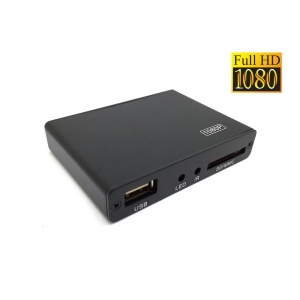
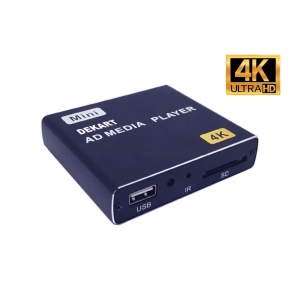
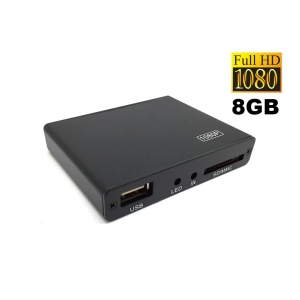
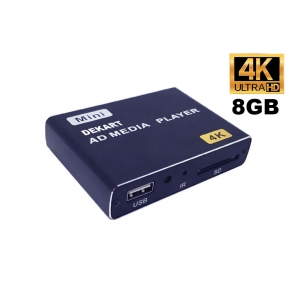
Digital Signage Media Players |
Media players for digital signage are the heart of any information system. Players for advertising and information displays are equipped with internet connectivity via LAN, WiFi or 4G, and differ in processor power, video playback quality, the ability to add widgets and split the screen into zones, cooling system and price. When choosing network digital signage players, it is important to pay attention to 24/7 operation capability, small form factor and passive cooling (fanless), durable metal housing and mounting options. With such media players, your system will last a long time and will not require regular maintenance. Most network advertising players can be managed via a browser from anywhere in the world, at any time.
What are Digital Signage Media Players and Why Do You Need Them
Digital signage media players are media players that play content from USB drives or internal memory and output video to your screens. They differ from other devices in that they have an auto-start function when power is applied and automatically play content 24/7 in a looped mode (auto-repeat). Advertising media players can operate 24/7 all year round.
A digital signage media player is a compact computer specifically designed for displaying multimedia content in automatic mode. The hardware used in media players is selected to easily broadcast high-definition images, video and animation. Explore our full range of displays and screens compatible with digital signage players.
In the past, desktop computers were used as digital signage media players. However, their size made them unsuitable for certain applications. It was difficult to hide them from the audience, and they were too heavy to be mounted behind the screen. Using desktop computers for advertising and information screens also results in a waste of computing power and memory. Alternatively, you could repurpose old PCs, which raises issues of performance, longevity and security. As advertising screens became more widespread, these problems became more pressing, and more compact and lighter digital signage media players were developed.
By removing unnecessary components, ports and bulky cases, digital signage media player manufacturers were able to offer a compact yet powerful solution for any organization that needed to deploy a digital signage system in any environment.
Standalone Advertising Players
Standalone advertising players play video from USB drives or internal memory. They are not controlled by software, but simply automatically play content from the storage device. This is the simplest and most reliable system for advertising on screens in public places. To display information or advertising, you need just two devices: a standalone advertising player with a USB flash drive, and a TV or advertising display (or projector). Then it's simple — copy files from your computer to a USB drive, then insert the USB drive into the player connected to the screen or projector. As soon as you power on the player, it will start displaying your information on the screen.
Dekart also produces "all-in-one" advertising screens that come with a built-in media player used to upload, store and display your content. Our catalog features many displays that can be used — from wall-mounted to freestanding totems and kiosks.
Network Digital Signage Media Players
Network digital signage media players are physical media players that play content that can be uploaded via LAN or the Internet. Essentially, these are media players with Internet-based control. Such players work hand in hand with your software and CRM systems, and are typically connected to your digital signage content management system (CMS).
By connecting network advertising players into a network, you can manage content and update information using your CMS (management system), and then output content to the screen. If you have a network of screens and are trying to display content on those screens, you will likely need a media player. Content can range from images or display ads to presentations, videos and GIFs. Regardless of the type of content, there must be a device that can be controlled remotely and that plays content from files and outputs it to your screen network.
How Do Digital Signage Players Work?
Digital signage players, unlike content management systems, are not a platform with a personal account. They are not a control center or dashboard that you need to check daily. A digital signage player is a system installed on a physical device that plays content on the screen. Once you set up the advertising player, you can simply let it do its job. Most of the work is done by your team on the CMS side. As mentioned, the CMS is the platform for managing content on screens, allowing you to control what is displayed on your screens as well as troubleshoot any issues that arise. This is where you will spend most of your time. If everything is set up correctly, the CMS and player will interact with each other on their own. Check out our projects with advertising screens and media players from Dekart.
What Makes a Good Advertising Player?
You will need a player that matches the needs of your task and budget. Most likely, you will need a player that works with any hardware you already have installed. You will also need the player to handle the types of content you want to display. Different players sometimes also have different memory limitations, so if you have a large network that loads large volumes of content or more complex content types such as videos or GIFs, your ideal digital signage player should be able to handle all of this without crashing or overloading. Want to learn more? Contact our advertising screen and player specialists.
Organizations often look to advertising screen solutions, information screens and advertising monitors to attract new audiences and effectively convey their messages. Advertising monitors can be found in various locations such as retail stores, airports, hospitals, hotels and corporate offices. Companies no longer think about whether to use advertising monitors, but rather how to choose the right digital signage solution.
When it comes to choosing the right media player solution for advertising monitors, there are several options, including USB-based advertising monitors, USB media player-based advertising monitors and computer-based advertising monitors. 68% of people say that advertising monitors have influenced their purchasing decisions. What are the main differences between these three types of digital displays with media players?
USB Advertising Players
USB-based advertising monitors involve using a USB drive to store and play content on the digital display screen. This method is relatively simple and cost-effective. Users can create content on their computers, transfer it to a USB drive and plug it into a compatible display. A USB-based advertising display is ideal for small deployments or temporary installations where simplicity and portability are key. However, it has limitations in terms of content management and remote control. Updating content requires physical access to the display, which can be inconvenient in large installations or remote locations.
Media Player-Based Advertising Monitors
Media player-based advertising monitors use a dedicated media player connected to the display. These media players are specifically designed for advertising monitors and offer more advanced features compared to USB-based solutions. Media players can handle various multimedia formats, support scheduling and playlist management, and often provide network connectivity for remote content updates. This enables more dynamic and interactive content. Media player-based advertising monitors are suitable for medium-scale deployments and offer a balance between affordability and functionality.
Computer-Based Advertising Media Players
Computer-based advertising media players involve using a standard computer or mini-PC as the media player. This option provides maximum flexibility and power in terms of content creation, customization and management. With a computer-based solution, users can leverage sophisticated software applications and design tools to create engaging and interactive content. Computer-based advertising players are suitable for large-scale deployments or installations requiring complex content management and interactivity. However, this is also the most expensive option and may require technical expertise for setup and maintenance.
When comparing these three options, several factors should be considered:
– Cost: USB-based advertising monitors are the most cost-effective option, followed by media player-based monitors. Computer-based advertising monitors tend to be the most expensive due to the additional hardware and software requirements.
– Content management: USB-based advertising monitors have limited content management capabilities, while media player and computer-based advertising monitors offer more advanced features such as scheduling, playlists and remote content updates. If you require frequent content updates or centralized management, media player or computer-based solutions are better suited.
– Customization and interactivity: Computer-based advertising monitors offer the highest level of customization and interactivity, allowing for complex multimedia content and interactive experiences. Media player-based advertising monitors offer some customization capabilities, while USB-based monitors have limited customization options.
– Scalability: USB-based advertising monitors are suitable for small deployments, while media player and computer-based advertising monitors can be scaled for larger installations. If you plan to expand your advertising monitor network in the future, consider a solution that offers scalability.
The choice between a USB-based advertising display, a media player-based advertising display and a computer-based advertising display depends on your specific requirements, budget and scalability needs. Carefully evaluate your needs and consider future growth to select the most appropriate advertising monitor solution for your business or organization. If you are unsure which advertising display solution is more suitable for your business, as a supplier and manufacturer of advertising monitors with over 10 years of experience in the advertising monitor industry, we can tailor an advertising display solution to fit your business.